This section describes the general structure of Friendly LWM2M client, the structure and purpose of its components, user interfaces and features of use.
- Overview
- Components
- User Interfaces
- State Management
- Registry Management
- Object Management
- Platform Dependencies
- Wpp Task Queue
- Integration and Flexibility
- Object Maker Tools
- Sumary
Overview
Friendly LWM2M client, also known as Wpp, is a project built upon the Wakaama project, which implements the Lightweight Machine to Machine (LwM2M) protocol. The architecture of Wpp is carefully designed to provide a high-level presentation of Wakaama functionalities while retaining control and flexibility.
Components
Since Wpp is built upon the Wakaama, the existing interfaces and capabilities of Wakaama affect the internal structure of Wpp. For a better understanding of what components should be present in Wpp, the Wakaama interface was segregated, based on it, the necessary components for Wpp were created.
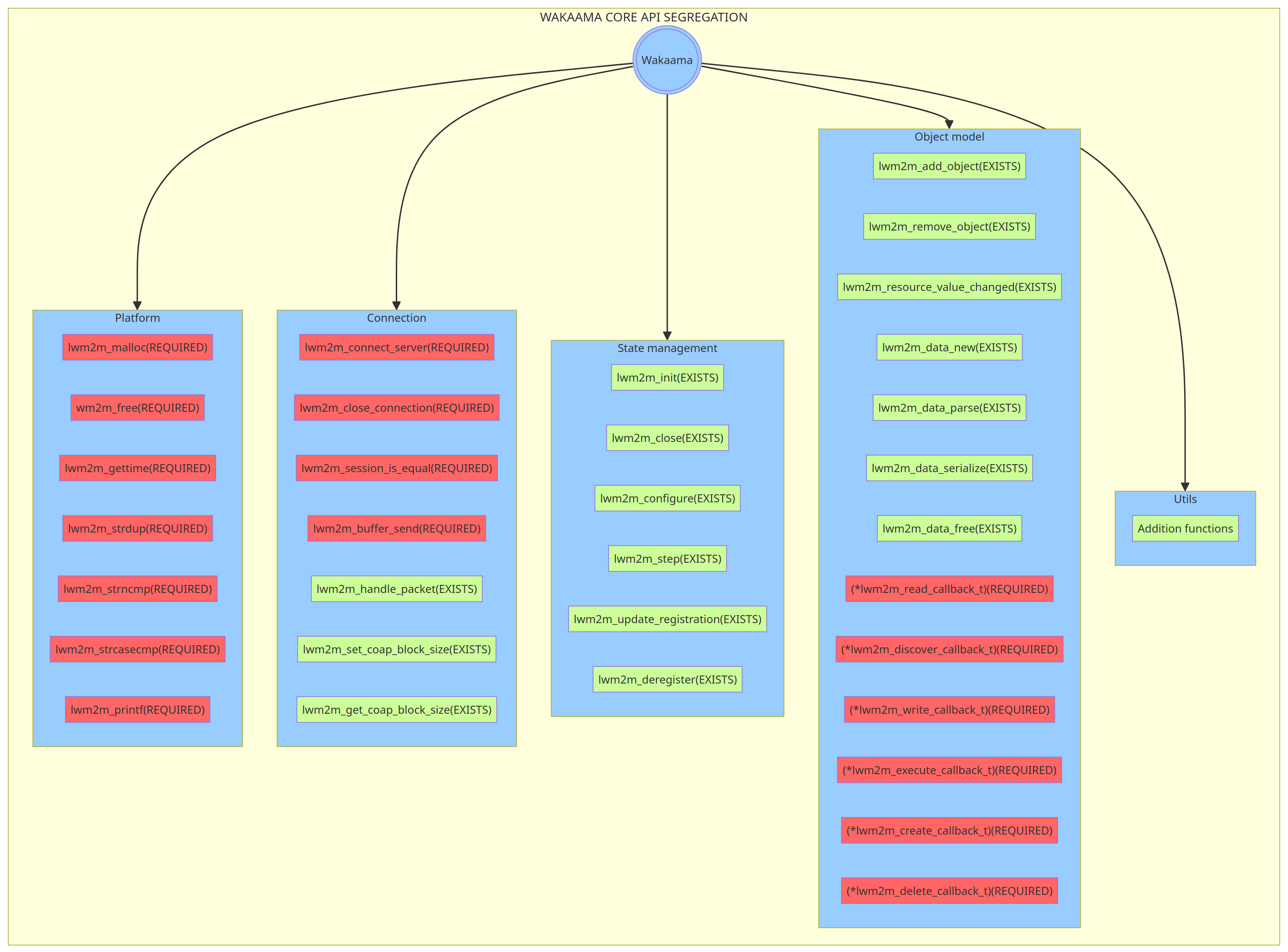
Wpp's architecture is composed of several key components, each serving a distinct role:
- State Management (wpp::WppClient): This component is responsible for the initialization of the Wakaama core, processing protocol states, managing server and object registrations.
- Object Model (wpp::Object wpp::ObjectImpl wpp::Instance wpp::Resource): This component is at the heart of Wpp's architecture. It defines the representation of objects at the Wpp level, their structure, general functionality, and sets the interface for interaction with instances and resources of the object, updating Wakaama about resource changes made by the user.
- Object Registry (wpp::WppRegistry): A crucial component that functions as a registry for available LwM2M objects. It manages the creation and initialization of objects and allows the user to create Instances and manage their resources.
- Connection (wpp::WppConnection): It defines the interface for establishing connections with the server and handling data transmission.
- Platform (wpp::WppPlatform wpp::WppGuard): This defines the interface for environment-dependent functions like memory allocation, logs printing, and time retrieval, and is entirely implemented by the user.
- Utils (folder utils): Includes various tools that is used by Wpp.
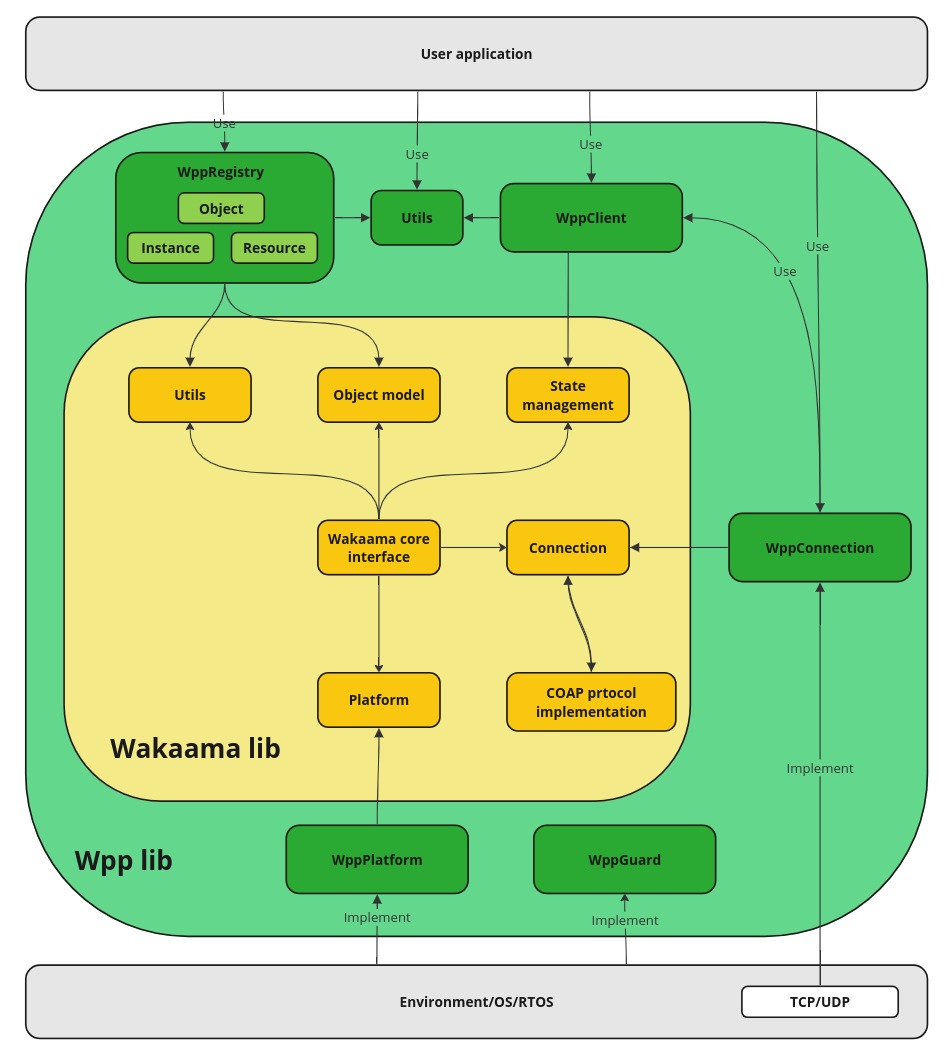
The diagram below shows the common Wpp components with their dependencies on Wakaama. A part of the Wakaama library with its components is highlighted in yellow, and a part of the Wpp library is highlighted in green. The dependencies of the environment and the user program from the Wpp library are also indicated.
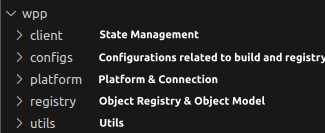
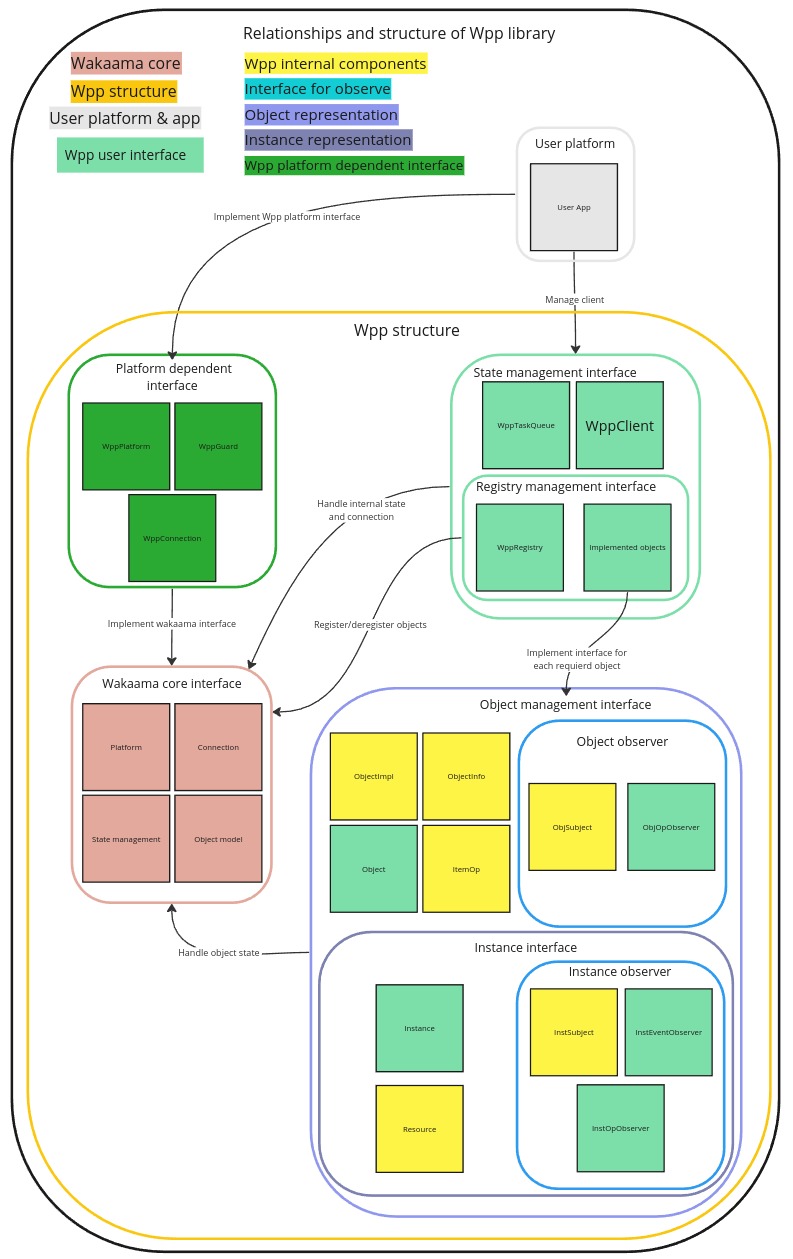
In the library, this structure has the following representation.
User Interfaces
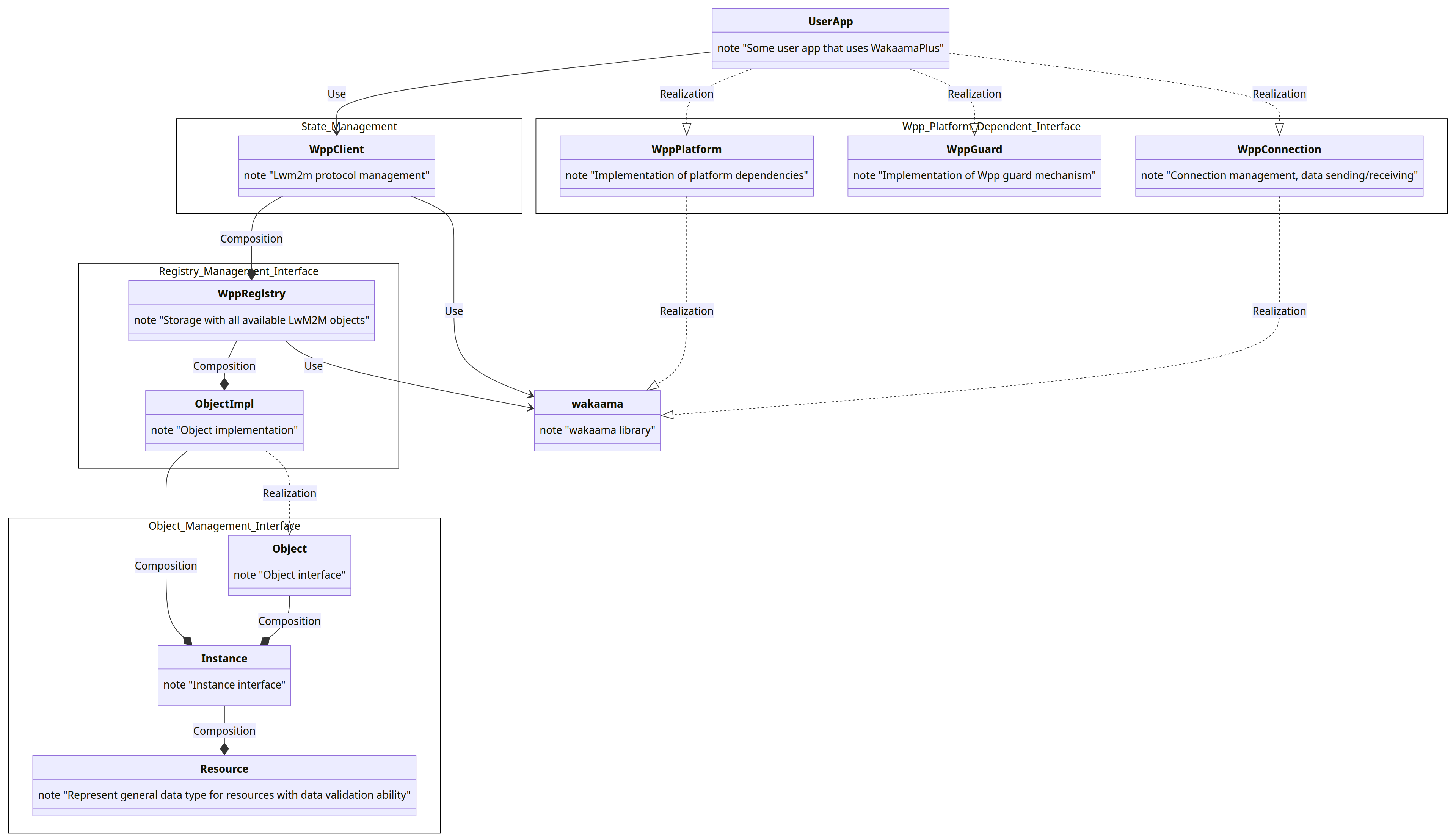
The main interface of the library consists of two main parts:
- Object registry management interface. Which is used by the user to initialize the client, gain access to the object register, and manage objects. It consists from the next interfaces:
- State management interface. Used by the user to initialize the client, get its state, access to registry, and manage registration. It consists from wpp::WppClient class which is implemented as singleton, and it is the main entry point through which interaction with the client takes place.
- Registry management interface. Used by the user to gain access to the objects in the registry, register build-in objects, and get their state. It consists from wpp::WppRegistry class which is part of wpp::WppClient.
- Object management interface. Used by the user to gain access to the objects state, instances, objects business logic, and internal data. It consists from wpp::Object, wpp::ObjectImpl, wpp::Instance classes, access to wpp::Object can be retreived through wpp::WppRegistry class.
- Platform dependent interface. It is used by the Wpp and must be implemented by the user or platform. It includes an interface for establishing connection, data transfer, and platform-dependent functionality like: get time, print logs, resource access guard. It consists from the next classes: wpp::WppConnection, wpp::WppPlatform, wpp::WppGuard.
State Management
The State Management interface is presented in the form of a single class wpp::WppClient, which provides a single access point for processing the internal state of the client and the object registry. This approach allows to synchronize access to internal state changes when using the client by different threads. To create a client, the user must call the wpp::WppClient::create() method, as parameters this method accepts a structure with information about the client, through which user can set its name wpp::WppClient::ClientInfo::endpointName, the second parameter is an object of class wpp::WppConnection that is implemented by the user.
Synchronization of access to the client is provided by the ownership mechanism, the client can be owned by only one program subject at a time, for this purpose a pair of methods wpp::WppClient::takeOwnership() and wpp::WppClient::giveOwnership() are used. Any actions with the client can be performed only after the wpp::WppClient::takeOwnership() method returns a valid object. After completing the manipulations with the client, the owner must return control over the client by calling the wpp::WppClient::giveOwnership() method. wpp::WppClient has two types of methods to take ownership wpp::WppClient::takeOwnership() and wpp::WppClient::takeOwnershipBlocking(), the first method works without any blocking, if the client is already owned, it returns an empty pointer, but wpp::WppClient::takeOwnershipBlocking() works differently, if the client is owned, it blocks its call until the client is released after which takes ownership of the client and returns a valid object.
The second important part of wpp::WppClient is wpp::WppClient::loop() method for state processing, which when called performs three main tasks: processing packets received from the server, processing tasks from wpp::WppTaskQueue, handling the internal state of the Wakaama library. After completion, the wpp::WppClient::loop() method returns the maximum time in seconds after which the user must call this method the next time. But if after calling wpp::WppClient::loop() the user creates a task wpp::WppTaskQueue which must be called earlier than the next call of the method wpp::WppClient::loop() , then in this case, the wpp::WppClient::loop() method must be executed earlier than scheduled for the timely execution of the user request. It should be noted that the time returned after calling wpp::WppClient::loop() is the maximum amount of time after which this method should be executed, while the minimum threshold is not set. Therefore, the user can call this method even without delays between calls. It should also be noted that the next call is timed in seconds, so there is no need to call wpp::WppClient::loop() more often than once per second, although this is acceptable. It is worth noting that the wpp::WppClient::loop() method can be called only after the user takes ownership of wpp::WppClient.
To access the registry, the client has a method wpp::WppClient::registry() that returns a registry object. Other methods and their purpose are described in the Code section at the following link wpp::WppClient.
Registry Management
The Registry management interface consists of one class wpp::WppRegistry, which represents the registry of all existing objects in the client. Each object that exists in the client must be represented as a separate method in wpp::WppRegistry, for example, for the object wpp::Device there is a method wpp::WppRegistry::device() which when called, returns the corresponding object. User can also use another way to get the required object through wpp::OBJ_ID, for this needs to call the wpp::WppRegistry::object() method and pass the ID of the corresponding object. Each existing object in the client has its own unique ID, which is reflected in the wpp::OBJ_ID enumeration. In addition to the fact that wpp::WppRegistry stores all objects and provides access to them, it also has a function that allows to register the corresponding objects on the server, this is a pair of methods wpp::WppRegistry::registerObj() and wpp::WppRegistry::deregisterObj(), there are also methods that allows to get the current state of the object, more details at the following link wpp::WppRegistry. wpp::WppRegistry was designed in such a way that it can be used together with a set of utilities for generating objects object_maker, so it is important not to disturb the internal structure and comments that exist in wpp::WppRegistry, and if it is necessary to do this, then it must be coordinated with utilities.
Object Management
The Object Management interface consists of four classes wpp::Object, wpp::ObjectImpl, wpp::Instance, wpp::Resource, but the user can interact with the interfaces of only two wpp::Object, wpp::Instance. The above classes represent the LwM2M data model of the object, which is described in the documentation 7.1. Resource Model. The general hierarchy is as follows: LwM2M has a registry with a description of each object, its resources and business logic Object and Resource Registry, but this representation is only in the form of text, not structure and code, therefore Wpp has its own representation of the registry in the form of the wpp::WppRegistry class, which stores instances of the data model that represents LwM2M objects. The mentioned data model contains wpp::Object, each object is a container for instances of its type wpp::Instance, each instance stores data specific to a certain object, these data are called resources wpp::Resource, resources are structures that display fields and object values according to the LwM2M description.
For a better understanding of the structure, it is worth describing each component separately:
- wpp::Object is at the top level and defines the interface/behavior for LwM2M objects. Its main task is to manage instances (wpp::Instance) of the object and process requests from the server with subsequent transfer of these requests to the corresponding implementation of the object. In fact, wpp::Object is a container for instances of the wpp::Instance class, it has the following methods to manage instances: wpp::Object::createInstance() to create a new instance (class instance wpp::Instance) by its ID, wpp::Object::remove() to remove an instance by its ID, wpp::Object::instance() to get the corresponding instance by its ID. Each instance of the wpp::Object class stored in the wpp::WppRegistry has a built-in monitoring mechanism via the wpp::ObjSubject class (wpp::Object inherits from wpp::ObjSubject), whereby wpp::Object receives the following method wpp::ObjSubject::opSubscribe(), this method is used by the user to observe an object. For example, if the server wants to create an object instance (wpp::Instance), then during this operation, if the user is subscribed to it, an event will be generated that will be sent to the user's observer. Since The user has wpp::ObjOpObserver observer, which is interfaces with a set of methods that must be implemented by the user. Each method corresponds to one of the events.
- wpp::ObjectImpl is a template class that is implements the required interface of the wpp::Object class. By itself, objects of the class wpp::Object cannot be created because it is an interface and it does not have all the necessary information about the type of instance it will store. wpp::ObjectImpl fully corresponds to the description of wpp::Object, the only thing that distinguishes it is the wpp::Object::createInstance() method implemented from the wpp::Object interface. It should be clarified here that wpp::Object and wpp::Instance are only interfaces that encapsulate a similar part of the code for all objects and provide the user with a unified access interface, but are not the final implementation of the object or its instance, because in order to be the final implementation of an object, needs to know the exact type of the wpp::Instance, and for different wpp::Object, wpp::Instance have different implementations and, accordingly, type. That is why there is wpp::ObjectImpl, which is a template class, thanks to which it is possible to create instances of a specialized type, and is the final implementation of the wpp::Object interface. When wpp::WppRegistry initializes its list of objects, it creates instances of exactly wpp::ObjectImpl to which it transfers the type of the final implementation of the instance, that is, the type of the class that implements wpp::Instance. For more information follow the link wpp::ObjectImpl.
- wpp::Instance this class defines the interface and common behavior for all instances of the LwM2M object. Inheritors of this class are created in wpp::ObjectImpl, the type of the inheritor wpp::Instance is specified as a template parameter for wpp::ObjectImpl. wpp::Instance is a container for object resource data 7.1. Resource Model. As it was already indicated, wpp::Instance contains a list of all resources (instances of the wpp::Resource class) for a specific LwM2M object, these resources are its main value because it is thanks to the data which are stored in wpp::Resource, the server can control the client and see its state. wpp::Instance is the only place to store data for an instance of an object, therefore, accordingly, it has two interfaces: for processing requests from the server and the second for processing requests from the user. Only the user interface will be considered, since it will be used when interacting with Wpp. So, the user interface can be divided into two parts, the first part allows to get information about the instance (to which object belongs, its ID), the second part is methods that allows to set, get and delete the value of a specific resource. To access these resources, the approach of get/set methods is used, in which the ID of the resource to be get or set is transferred. wpp::Instance uses two approaches to set resource values, with and without copying wpp::Instance::set(..., const T &value). If wpp::Instance::set(..., const T &value), then one copy will be stored on the user side and another in wpp::Resource. If wpp::Instance::set(..., T &&value) method, copies will not be created, data is moved to wpp::Resource without creating a copy. There are two types of resources SINGLE and MULTIPLE, these types indicate whether the resource can store only one value or more (actually an array of values). If wpp::Resource is MULTIPLE, wpp::Instance::clearRes() and wpp::Instance::removeRes() methods can be useful, because they allow you to clear an array of values entirely wpp::Instance::clearRes(), or to remove a specific value wpp::Instance::removeRes(). The interface and features for wpp::Instance have been described, now it is worth describing the method of notifying the user about events and their types. wpp::Instance there are two types of events: notifications about operations from the server side (ItemOp::TYPE type) and event notifications are inherent in the implementation of wpp::Instance, their presence and purpose is determined by the implementation itself. The observation approach is the same as for wpp::Object, there is a class wpp::InstSubject from which wpp::Instance is inherited, through inheritance wpp::Instance gets two methods that allow the user to subscribe to server operations wpp::InstSubject::opSubscribe() and to custom events wpp::InstSubject::eventSubscribe(). For observation, the user must implement one of the observer interfaces, wpp::InstOpObserver for observing server operations, wpp::InstEventObserver for observing custom events wpp::Instance.
Platform Dependencies
The Platform Dependencies interface consists of three classes wpp::WppConnection, wpp::WppPlatform, wpp::WppGuard. Each of these classes is an interface that must be implemented by the user. An example of the implementation can be found here. The wpp::WppGuard class is responsible for providing synchronization mechanisms for accessing shared resources. It provides methods to lock, unlock, and try_lock the guard object. The user must implement these methods according to their specific synchronization requirements. wpp::WppPlatform uses the Linker Callback pattern the same as wpp::WppGuard, where the implementation of methods is carried out on the user side. It provides functions for retrieving the elapsed time, printing messages, and simplifying the usage of the print function. wpp::WppConnection provides an abstract interface for establishing and managing connections in the Wpp. It defines pure virtual methods that must be implemented by the user to establish a connection, disconnect, compare session identifiers, and send packets over the connection. The wpp::WppConnection class also provides methods for adding packets to a queue, retrieving the size of the packet queue, clearing the packet queue, and setting/getting the COAP block size.
Wpp Task Queue
Wpp Task Queue tool for planning and executing tasks in the context of wpp::WppClient. As described in the section **State Management** the client can be owned by only one program subject at a time, but what if it is necessary to make changes to the registry when the registry is already owned? You can call the wpp::WppClient::takeOwnershipBlocking() method, but in this case the execution of the thread will be blocked until the client is released, but if blocking or any waiting is not allowed, then you can schedule a task in the context wpp::WppClient. This is only one of the problems that wpp::WppTaskQueue solves, also its functionality allows to schedule cyclic tasks, or tasks that must be performed before a specific condition occurs. A more detailed description of its capabilities and use can be found at the following link wpp::WppTaskQueue. It is worth noting several features of the wpp::WppTaskQueue implementation for a better understanding of its operation. The created tasks are processed all together sequentially, at the time of calling wpp::WppClient::loop(), so the frequency of calling tasks depends on the frequency of calling the wpp::WppClient::loop() method, but this does not mean, that wpp::WppClient::loop() must be called continuously because the granularity of deferred task invocation is measured in seconds. wpp::WppTaskQueue does not guarantee that the task will be called on time, the only guarantee is that the tasks will not be called before the specified time. Each task is called in the context of wpp::WppClient, which means that the user cannot make changes to the registry at this time, the executed task is actually the sole owner of the registry. From the context of the task, you can safely use the wpp::WppTaskQueue interface to create new tasks, delete them, and get the status. If a task is created from the context of an executed task or during task processing, then it can be executed only at the next call to wpp::WppClient::loop(), if a request was created to delete a task that is currently being executed, then the removal process will only happen after the execution is complete. If another task is deleted from the execution environment or elsewhere, and it has not yet been executed, then it will be deleted without execution. The task that is being executed must not contain delays or blocks in its code, as this will delay the execution of all other tasks and the processing of the client's state.
Integration and Flexibility
Wpp's architecture allows for easy integration into new environments and the possibility to implementation Platform dependent interface as per environmental requirements. This flexibility is attributed to the absence of external dependencies, as Wpp defines all input and output interfaces, and the environment implements them. For integration to new environment user should implement the next interfaces: wpp::WppConnection, wpp::WppPlatform, wpp::WppGuard. Example can be found in the platform folder.
Object Maker Tools
As mentioned in the section Registry Management, for Wpp a complex of utilities object_maker has been developed for generation, integration, deletion and update of objects in the form of source code. object_maker is not a critically important part of Wpp without which the creation of new objects is impossible, it is more of an auxiliary character to simplify tasks related to the modification of the object registry. Let's consider in more detail the capabilities of object_maker:
- Object generation. To generate a utility object, you must have its description in the form of a **.xml** file (more details on the format can be found here), the file can be presented locally or as a URL link. As a result of generation, a folder is created with the source code for the object that needs to be integrated into Wpp. The created folder contains 5 files with code and object_metadata.json with metadata that is necessary in the other utils.
- Integration of the object. To integrate the utility must know the path to the folder with the description of the object. As a result of the integration, the folder is copied to objects and the object is added to wpp::WppRegistry, after which the user can use the corresponding object in their code.
- Deleting the object. To delete the utility must obtain the path to the folder of the corresponding object in objects, after which the specified object will be deleted from Wpp.
- Updating the object. To update the utility must receive two parameters: the path to the **.xml** file with the updated description of the object and the path to the folder of the corresponding object in objects. The main task of this utility is to transfer the implementation from the old version of the object to the new one. It is not recommended to be used without a critical need and understanding of the consequences.
Summary
The architecture of Friendly LWM2M client (Wpp) is a well-structured framework that provides a robust platform for the development and implementation of LwM2M client applications. It maintains a balance between high-level functionality and control, and is designed to be flexible and adaptable to various user and environmental needs.